How to track grant deadlines without a grants manager
Most small nonprofits do not have a grants manager. Whoever signed the award owns it, on top of everything else they already do. Here is a method one person can run across every award, with no new hire and no title change.
The method
- Read the agreement the week it arrives, not when a reminder goes off. Find the closeout, final report and every interim report date, and note each one before the letter gets filed away.
- Keep one list for every award you hold, not one note per grant. A single list is what lets you see what is due this month across all of them, instead of reopening each PDF to check.
- Write down the rule, not just the date. Something like “quarterly, 30 days after quarter end,” because a no-cost extension or amendment moves the date, and the rule is what lets you recompute it.
- Add lead time. A reminder 30 and 14 days before each due date, with a hard stop a week before. If you are the only one watching it, lead time is what forgiveness looks like.
- Name one backup per award. A board treasurer, a part-time bookkeeper, anyone who could submit a report if you were out sick or on leave. Write their name next to the date, not just your own.
- Set a recurring 15 minute review. Weekly or monthly, on your own calendar as an appointment. This is the step that actually gets skipped, and skipping it is how a date gets missed.
Your award agreement and your funder's instructions are the authority on every date and requirement. This page is a working method, not legal, audit or compliance advice.
Where this breaks down
One list works cleanly for one or two awards. It gets harder at three or four, once each funder has its own period dates, its own reporting rule and its own idea of what "quarterly" means. At that point the problem is not that you forgot the steps above; it is that the dates live in separate PDFs and nobody but you ever checks the list.
What a backup actually needs
A backup is not "someone who could, in theory, figure it out." Give them the award letter, the current list, and permission to act on it. If a funder's portal login is tied to your name, ask whether a second person can be added as a user, the same way you would for any staff transition.
The faster path, and what it does not do
GrantClose keeps the same list, but it reads each award letter for you. Upload it and it suggests the reports and dates, with the source sentence and page next to each one; nothing becomes a deadline until you confirm it. Every deadline gets one owner, reminders go out at 30, 14, 7 and 1 days before and on the due date, and weekly once something is overdue. You can reassign an owner to a board member or anyone else on your GrantClose org at any time, which is the backup plan above, kept somewhere other than your memory.
- It does not write your reports, decide what a clause means, or contact a funder.
- A scanned letter with no text layer cannot be read automatically; it opens manual entry instead.
- Suggested dates are suggestions. Check each one against the agreement before you confirm it.
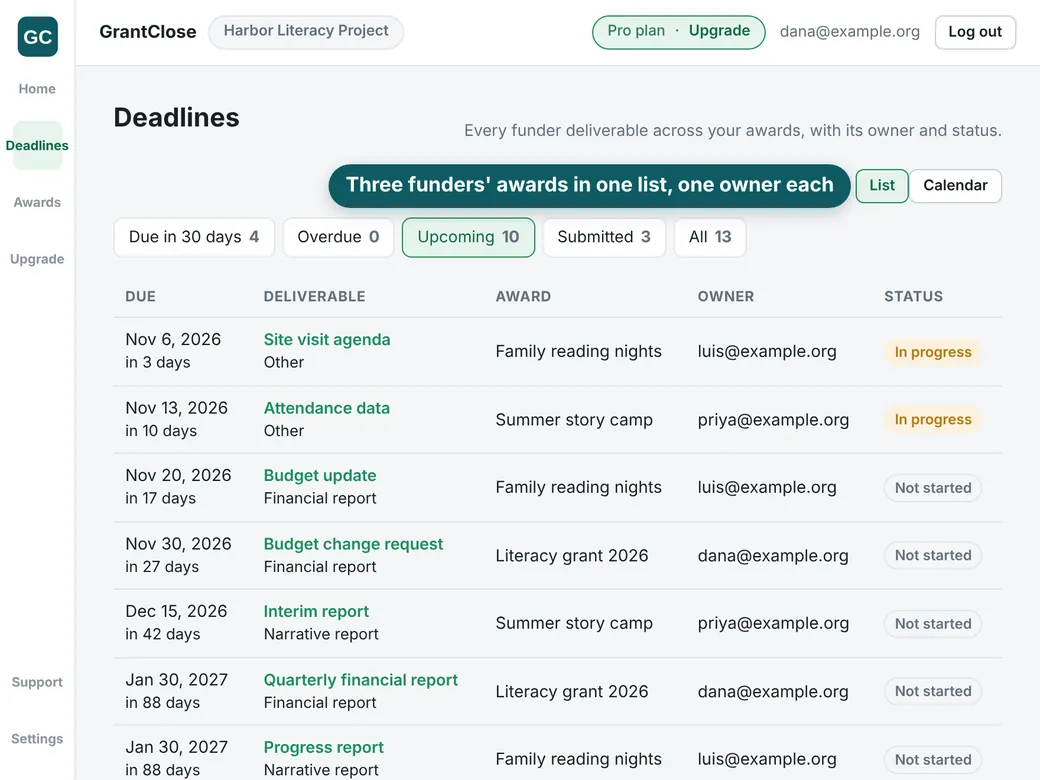
GrantClose keeps every award's dates in one list with an owner and reminders, so a single person can run it the same way across one award or several. GrantClose never submits anything to a funder, writes your reports or gives legal, audit or compliance advice. Free for 1 active award, no card required. Create a free account
Questions
Do I need to hire a grants manager to do this?
No. Plenty of small nonprofits run this with one person and a checklist. A dedicated grants manager tends to become worth it once several funders' calendars no longer fit comfortably on one list.
What is the minimum I should track for each grant?
Funder, award number, the period start and end dates, every report's due date with the rule it came from, one named owner, and where the evidence for it lives.
Does GrantClose read the award letter for me?
Yes. Upload a PDF with a text layer or a Word file and it suggests each date next to the sentence and page it came from. Nothing becomes a deadline until you confirm it.