I just accepted a grant award: what do I do in the first 30 days?
The first 30 days decide whether the rest of the award runs on dates you wrote down or dates somebody remembers. Here is a sequence that ends with every report dated, every date owned and the evidence folder open, using nothing but a spreadsheet and a calendar.
The 30-day sequence
- Days 1 to 3: save the signed agreement and everything attached to it. Put the executed award, the acceptance if you returned one, the approved budget, the scope and every attachment in one award folder with a naming rule. See how to organize grant files.
- Days 1 to 3: read the whole thing once for obligations, not only reports. Highlight the period dates, how and when you are paid, every report, the changes that need the funder's written approval, any match or cost share, restrictions on what the money may buy, record retention, closeout terms and any notice you must give the funder (for example, when a named person leaves).
- Days 3 to 7: list every deliverable and the rule that sets its date. One row per report, payment request, notice and closeout item, with the sentence from the agreement that creates it. See how to find the reporting requirements in an award letter.
- Days 3 to 7: turn each rule into real dates. A rule like "quarterly, 30 days after each quarter" becomes four dates. Count calendar days, not months. The free grant reporting schedule calculator does the counting in your browser, and the reporting calendar guide shows the manual method.
- Week 2: name one owner for each date, plus a backup. One accountable person per deliverable, and a second person who can step in. See who should own each grant deliverable.
- Week 2: set up the money side. Give the award its own class or code in your accounting, decide who prepares payment requests and how staff time will be recorded. See what to include in a grant reimbursement request and how to document staff time on a grant.
- Week 2: list what needs the funder's yes before you act. Budget moves, scope changes, key staff changes and extensions are the usual ones. Write the rule and the contact beside each. See how to ask a funder to change your grant budget.
- Week 3: open the evidence folders. One sub-folder per deliverable, empty, named the same way as the row on your list, so proof has a place to land the day it exists.
- Week 3: brief everyone who touches the award, for 30 minutes. Walk through the dates, the owners, what needs approval and where evidence goes. Send the list in writing afterwards.
- Day 30: review and set the rhythm. Check that every deliverable has a date, an owner and a folder, and put a recurring monthly check on a calendar. How to track grant report deadlines covers the weekly and monthly habits.
Your award agreement and your funder's instructions are the authority on every date and requirement. This page is a working method, not legal, audit or compliance advice. For federal awards, the terms of the award are covered by 2 CFR 200.211 and reporting by 2 CFR 200.328.
A worked example (made-up award)
A one-year award starts 1 January 2027. The agreement asks for quarterly reports 30 days after each quarter ends and a final report 60 days after the end date. In week one the coordinator lists five deliverables and counts the dates: 30 April, 30 July, 30 October, 30 January 2028 for the quarters, and 29 February 2028 for the final report (2028 is a leap year). In week two she names the program director as owner of the program sections and the bookkeeper as owner of the financial parts, each with a backup. By day 30 all five dates are on a shared calendar and the five folders are open.
Common mistakes
- Only reading the reporting section. Approval triggers, match and notice duties hide elsewhere in the agreement.
- Keeping dates in one person's head. The first absence or resignation finds the gap.
- Naming a team as owner. A deliverable needs one person.
- Waiting for the first report to set up files. Evidence is cheapest to save the week it is made.
- Skipping the approvals list. Most surprises are things done without a funder's written yes.
The faster path, and what it does not do
GrantClose is built for exactly this month. Upload the award letter as a PDF or Word file, and it lists the dates it finds with the sentence each one came from. Nothing becomes a deliverable until you click to confirm it, you give each one an owner, and reminders go out at 30, 14, 7 and 1 days before and on the due date, then weekly while overdue. Evidence is attached to the deliverable it proves, and at closeout you can export one ZIP per award with an index and a SHA-256 checksum per file.
- A scanned letter with no text layer cannot be read, so GrantClose says so and opens manual entry.
- It does not write your reports, submit anything to a funder or tell you what your agreement means.
- The manual method above works without it, and the free grant reporting schedule calculator needs no signup.
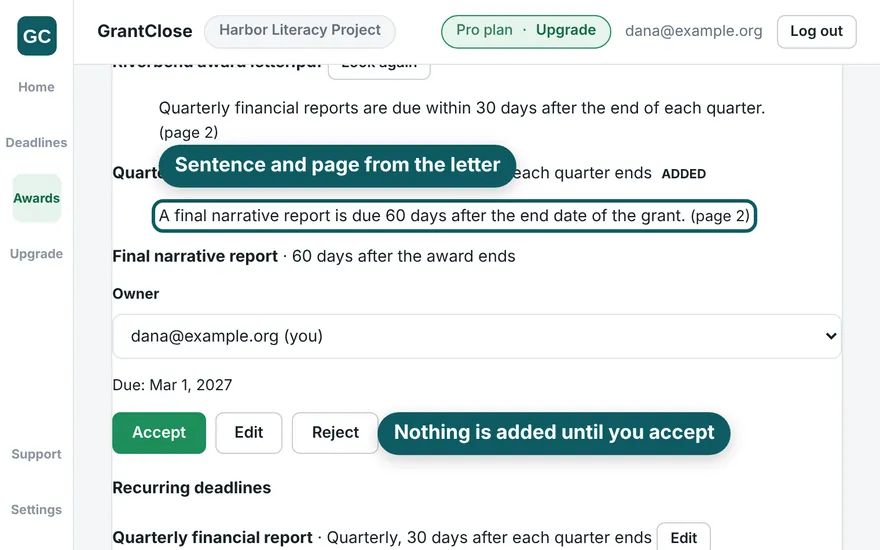
GrantClose turns an award letter into dated deliverables you confirm one by one, each with an owner and reminders. It does not write reports, submit anything to a funder or give legal, audit or compliance advice. Free for 1 active award, 1 seat and 250 MB of files. Create a free account
Questions
What should I do first after accepting a grant award?
Save the signed agreement and attachments in one folder, then read the whole agreement once and list every report, payment request, notice and approval it creates, with the sentence that sets each date.
Do I need to sign or return anything to accept a grant?
Many agreements ask for a signature, countersignature or written acceptance by a stated date. Read yours for what is needed, by when and to whom, and keep the executed copy.
How do I find out when my first report is due?
Look in the agreement for the report schedule and what each date counts from, then count calendar days. The free grant reporting schedule calculator does the counting from the award dates.
Who should manage a new grant at a small nonprofit?
Give each deliverable one named owner and a backup, and one person the overall list. Split the program and financial parts of each report between the people who hold that information.
How do I keep track of everything an award requires?
Keep one list of deliverables with dates, owners and a status, and review it weekly. A spreadsheet works; the point is that every date has an owner.